

MackOps for trades
Run every job
from the truck.
The booking. The crew. The client’s OK.
Keep the whole job moving, wherever the day takes you.
Plus applicable taxes
Their job. Their own portal.
They see progress.
You keep moving.
Give every client a place to see what’s happening with their job. Updates and photos stay together, so the latest answer is already there.
- 01 See where the job stands
- 02 Follow updates from the crew
- 03 View the latest job photos
Hey, Alex.
Here’s how your renovation is coming along.
The next chapter is taking shape.
The crew is on site. Follow the latest work here as your space comes together.
New photos have been added to your job.
The crew added a photo from today’s work.
The crew is on site and ready to get going.
The job details are all in one place.

The progress photos stay with the job, ready for the client to view.
Interactive example · sample client and generated photos
Your side of the job
One place.
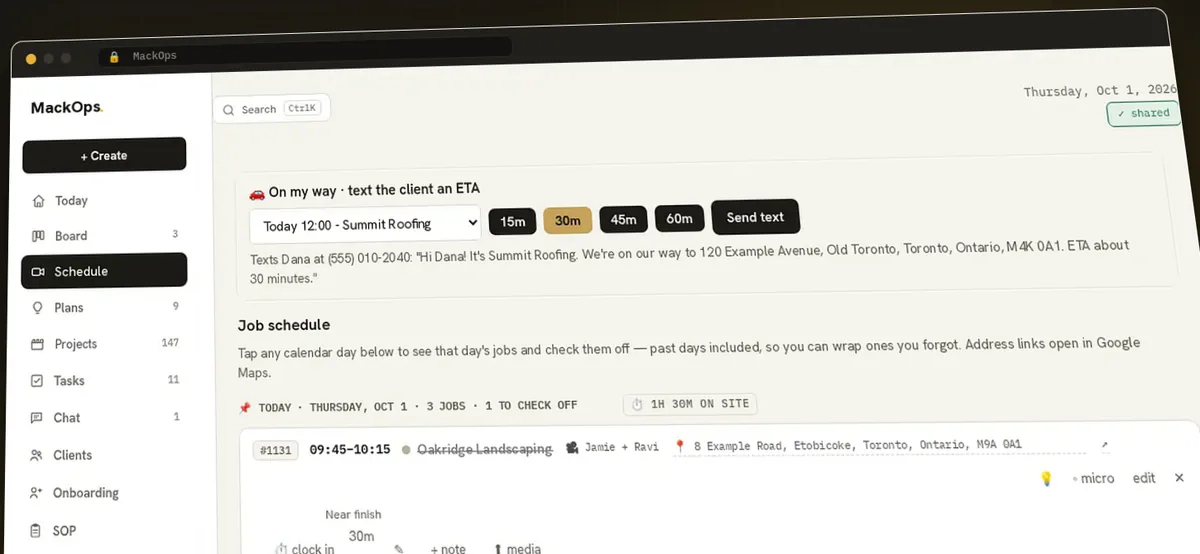
Before you even pull up.
The schedule, the address and the work still to do. Ready when the crew is.
Quote it on site.
Line items, tax and totals worked out for you. Turn the quote into an invoice when the job is done.
Keep the paperwork close.
Capture receipts on site and keep billing with the work, through to the invoice and closeout.
Show the finished work.
Turn job photos into posts for Instagram and Facebook, with the work and the story in one place.
Made around real work
Built by a team that spends its days on job sites, then tells the story of the work.Tomas Makacek · Founder
Makacek Media, Toronto. Content for trades, builders and real estate.
For your next job
Less chasing.
More building.
Bring the crew, the client and the job together. We’ll help you get set up.
Early crews · from
$100 USD / month
Plus applicable taxes
No spam, no drip sequence. One email when your invite is ready.
Book a walkthroughA human helps with setup and bringing your jobs in. Join the waitlist to hear when the next onboarding batch opens.
Can clients see what’s happening with their job?
Yes. Their client portal gives them a place to follow job updates and photos. The example above shows how that can feel on a phone.
Will it work for the crew on site?
MackOps is built to be used from a phone, with the day’s jobs, clock-in at the job site, checklists, photos and receipts available in the field. GPS clock-in is coming soon.
What can I publish to?
Instagram and Facebook publishing are live. TikTok, YouTube, LinkedIn and Google Business Profile are rolling out. We’ll cover current availability in your walkthrough.
Do you help us get started?
Yes. Early crews get human onboarding, help bringing jobs into the system and a direct way to give feedback.
Photography is generated concept imagery, not customer projects. Interactive portals and panels are examples with sample data; nothing is sent.