 MackOps
A project budget for a small trade crew is a single running total for one job: what you quoted, what you have spent so far, and what is left. The quoted amount usually starts as the accepted estimate, before tax. Spent is the receipts and crew hours already on that job. Left is the difference. When those numbers live in three different places, you often find out you went over only when you write the invoice.
Why job costs get away from a small crew
The quote is written, the job starts, and the money gets tracked in pieces:
- The accepted price sits in an email or a PDF.
- Receipts live in a folder, a chat, or a coat pocket.
- Hours live in someone's head, or on a timesheet that is not tied to the job.
- A change gets approved on site, and nobody adds it back to the number you quoted.
None of this means the crew is careless. It means there is no one place that shows quoted, spent and left while the work is still going.
A simple budget habit for each job
You do not need a complicated costing system to start. A habit like this works on paper too:
- Set the allowed amount when the quote is accepted. Use the accepted quote as the budget, before tax. If you also type a budget by hand, keep one number as the source, not two.
- Put every receipt on that job. Materials, supplies and other job costs should land on the project they belong to, not in a general pile.
- Clock hours on that job. When time is recorded against the address, labour can be counted with the receipts.
- Add approved changes to the quoted amount. A yes from the client on extra work should raise the budget, so you are not measuring spend against the old price.
- Look at quoted, spent and left while the job is still open. If you are over, you want to see it before the last day on site.
The point is not a perfect forecast. It is a clear view of where the job stands.
What to look for in job costing software
If you are moving the budget off a spreadsheet, these are the questions that matter for a small crew:
- Can the budget come from the accepted quote, instead of being typed again?
- Does spent include both receipts and crew hours on that job?
- Can you see, in one place, what you allowed, what you have spent, and what is left?
- Do approved change orders add to the quoted amount?
- Is it obvious when a job is over the quoted amount?
- Can you open it on a phone, not only on a desktop?
How MackOps handles project budgets
MackOps is job management software for small trade crews. On the budget side, an accepted estimate can become the job, with the quote set as the project budget. You can also follow up on a quote by text until the client accepts, then start from that number.
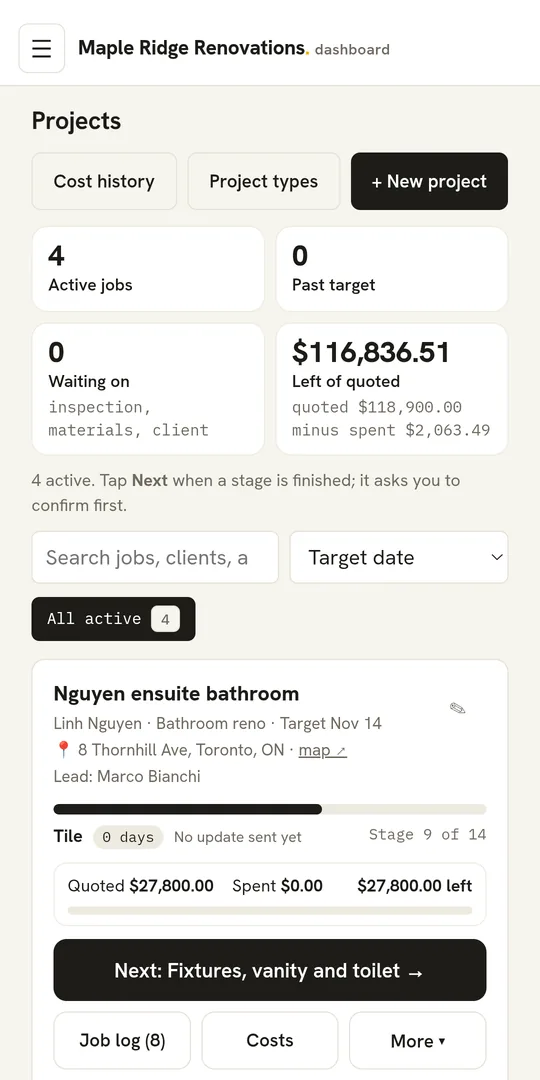
The budget is taken from the accepted quote before tax, and it stays at that figure even if the quote is opened again later. You can also pick a quote under Budget from a quote, or type a budget if no quote is linked. On the project you see Quoted, Spent and what is left. If spend goes past the quoted amount, that left figure shows as over, in red.
Project budgets in MackOps also open a Costs view. In plain words it shows what you allowed, what you expect the job to cost (from the price list's costs, when those are entered), what you have spent so far, and what is still to come. Allowed is the accepted quote, before tax, plus any approved change orders. Spent so far is receipts before tax, and crew hours when pay rates are loaded. If some quote lines have no cost in the price list yet, the expected cost is marked as incomplete, not guessed.
Receipts can be captured for a project, so those costs show on the job. GPS clock-in at the job records hours against the address, which is how crew time gets into the same budget. Across active jobs, admins also see how much is left of quoted, meaning quoted minus spent.
What do contractors ask about project budgets?
Should the budget include tax?
Keep the budget on the same basis as the quote subtotal you work from. In MackOps, the allowed amount and the receipts are both counted before tax, so the comparison stays like for like.
Do change orders belong in the budget?
Yes, once the client has approved them. In MackOps, approved change orders add to the quoted amount on that project.
What if I do not have a quote linked yet?
You can still type a budget on the project, and you can still record receipts and hours. In MackOps, a project with no quote linked tells you to pick one if you want the quoted figure to come from an estimate.
Can the crew see the whole budget?
The running quoted, spent and left figures are on the project. Some cost details, such as pay rates, stay with admins. In MackOps, pay rates are visible to admins only, and if rates are not loaded, crew hours can show without a labour cost.
How much does MackOps cost?
MackOps plans are Solo at $49 USD a month, Trades from $99 and Agencies from $249, plus applicable taxes. Trades and Agencies prices depend on team size. MackOps is in early access with a waitlist.
To see it on a real job, join the MackOps trades waitlist.
About the author: Tomas Makacek is the Toronto-based founder of MackOps and Makacek Media. He runs a content agency serving trades and built MackOps from working with contractor clients.