 MackOps
Quote follow-up by text is a short message you send after an estimate goes out, so the client knows it arrived, can open it on their phone, and has an easy way to reply. The quote itself should still be a proper document, with line items, tax and a total. The text is how you keep that document from sitting unopened while you are already on the next job.
Why quotes stall after they go out
For a small trade crew, writing the quote is only half the work. The stall usually happens after it leaves your hands:
- The client meant to look at it later, then the email got buried.
- They have a question about one line, but they do not want to call while you are on site.
- You sent it from a personal inbox, and there is no clear record of what went out, or when.
- You are back on the tools the next morning, and follow-up slips by a week.
None of this means the price was wrong. It often means the quote never got a real look, or the client did not know how to say yes.
What a good follow-up text looks like
A useful text is short, named, and easy to answer. It should say who you are, which job the quote is for, and what you would like them to do next. A typical message looks like this:
Hi Sarah, this is Dave from Northside Renovations. I just sent the quote for the kitchen at 14 Oak Street to your email. You can also open it here: [link]. Any questions, just reply to this text.
That is enough. They can open the quote, sit with it, or write back a question without booking a call.
Leave the line items out of the text. A wall of numbers is hard to read on a phone, and it is easy to typo a total. The text gets them to the quote. The quote is where the numbers live.
A simple follow-up rhythm
You do not need a complicated sequence. A rhythm like this works from your phone:
- Send the quote as a proper document, the same day if you can. Email is fine. So is a printed copy left on the counter. The client should be able to see line items, tax, the total, and how long the price is good for.
- Text them right after it goes out. Tell them it is on its way, and include a link they can open if you have one. This is a heads-up, not a nudge.
- If you have not heard back, send one short check-in. A few days later is plenty. Ask if they had a chance to look at it, and whether they have a question. Do not re-pitch the whole job.
- Before the quote expires, say so once. A short note that the price is good until a date gives them a reason to decide, without pressure.
- Close the loop. If they accept, confirm the next step, such as a start date or the deposit. If they decline, thank them and leave the door open. If they never reply, one last message that you will close the quote out is enough.
The aim is not to chase. It is to make sure the quote was seen, and that a yes or a no does not get lost.
What to put in the text, and what to leave out
A few habits keep follow-up useful instead of noisy:
- Use your business name and a real first name. People reply to a person.
- Name the job. The address or the room is enough, so they do not mix this quote up with another one.
- Ask one easy question. "Any questions, or would you like to go ahead?" is enough.
- Do not paste the full quote into the text. Send the document, then point to it.
- Do not turn follow-up into marketing. A reply about a quote they asked you for is a normal business conversation. Adding them to promotional texts is a different thing. In Canada, commercial electronic messages fall under CASL, and in the US, texting rules include the TCPA, so check the rules that apply to you before sending marketing texts.
If the quote has a lot of options, the client is unhappy, or the number is a stretch for the budget, pick up the phone or go back in person. Texting is for getting the quote opened and collecting a clear yes, no, or question.
Does a text replace the quote?
No. A text is a pointer, not the estimate. The document should still show the work, the quantities, the tax and the total, and it should be something the client can accept or decline without guessing. If you only text a round number, you have nothing to go back to when the scope changes.
How MackOps handles quotes and follow-up
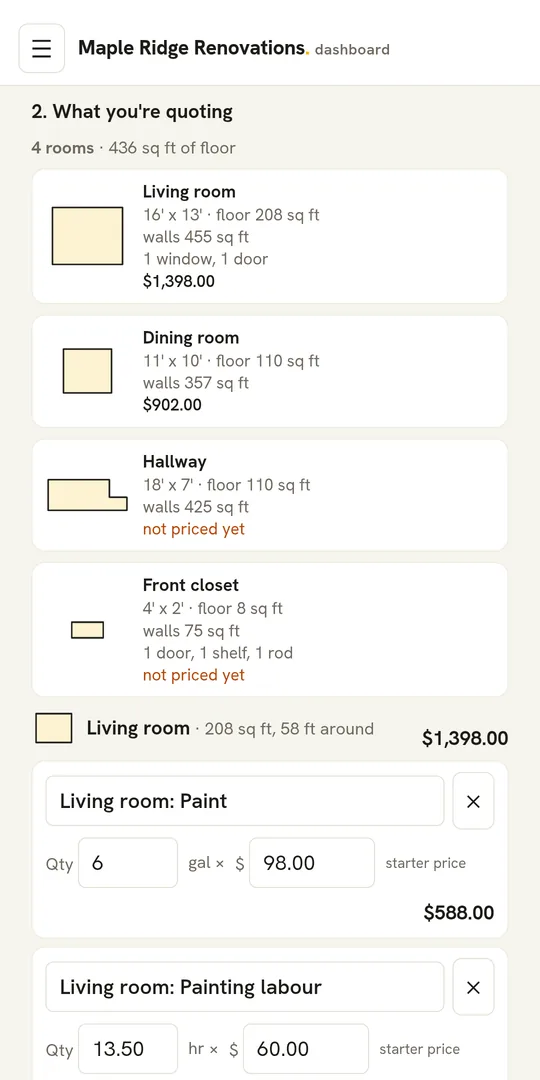
MackOps is job management software for small trade crews. On the quoting side, you build an estimate from your own price book, with line items, tax and totals worked out for you. You can also count and measure from the plans and send those quantities into the estimate.
When the quote is ready, you send it to the customer by email under your company name, and replies come back to your own inbox. It goes out with a number and a date, a copy comes to you, and the message includes an Accept this quote button. The customer can tick any optional add-ons, accept, and then see the deposit and how to pay it. Nothing is charged on that page. After you send it, you can copy the accept link and text it to the customer yourself, so they can open the same quote on their phone.
MackOps tracks whether the quote is a draft, sent, accepted or declined. A quote can carry a validity period (30 days if you do not set a different one). If the customer accepts, the estimate can become the job, and the accepted quote is frozen, so later changes need a new quote or a change order. If you edit a sent quote, those changes reach the customer when you send it again.
MackOps does not text the quote for you, and it does not send follow-up texts on a timer. The follow-up is still yours to write. For other job texts, such as a reminder the evening before, or an On my way message, see our guide to missed-call text-back and two-way texting for contractors.
What do contractors ask about following up on quotes?
How soon should I follow up on a quote?
Send a short text as soon as the quote goes out, so they know to look for it. If you have not heard back, one check-in a few days later is enough for most jobs.
Should I text the whole estimate?
No. Keep the numbers in the quote document and use the text to point to it. A link the client can open on their phone is better than a long list of line items in a message.
What if the client never replies?
One check-in, then a last note before the quote expires, is a fair effort. After that, close it out and move on.
Can a client accept a MackOps quote from their phone?
Yes. They can accept from the email, or from the accept link you copy and text to them. They can include optional add-ons when they accept.
How much does MackOps cost?
MackOps plans are Solo at $49 USD a month, Trades from $99 and Agencies from $249, plus applicable taxes. Trades and Agencies prices depend on team size. MackOps is in early access with a waitlist.
To see it on a real job, join the MackOps trades waitlist.
About the author: Tomas Makacek is the Toronto-based founder of MackOps and Makacek Media. He runs a content agency serving trades and built MackOps from working with contractor clients.